February 10, 2026
Person analyzing website speed optimization on multiple devices with PageSpeed Insights showing a low score

Beginners’ Guide to Website Speed Optimization — Improve Load Time & SEO

If there is one thing every website owner learns sooner or later, it’s this: a slow website costs you visitors. It doesn’t matter how beautiful your layout is or how valuable your content feels — if your page takes too long to load, people leave before they even see a single word.

In today’s fast digital world, people expect speed. They expect a website to open instantly, respond smoothly, and feel effortless to use. And when you’re just starting your online journey, the idea of improving your site’s speed may feel overwhelming — caching, minifying, CDN, compression… all these terms sound too technical.

But here’s the good news:

Website speed optimization is not as hard as it looks, and even beginners can make huge improvements with a few simple steps.

In this beginner-friendly guide, you’ll learn why speed matters, what slows your site down, and how to fix it with practical, easy-to-follow steps. By the end, you’ll have everything you need to make your website load faster, rank better on Google, and deliver a smooth user experience.
Why Website Speed Matters

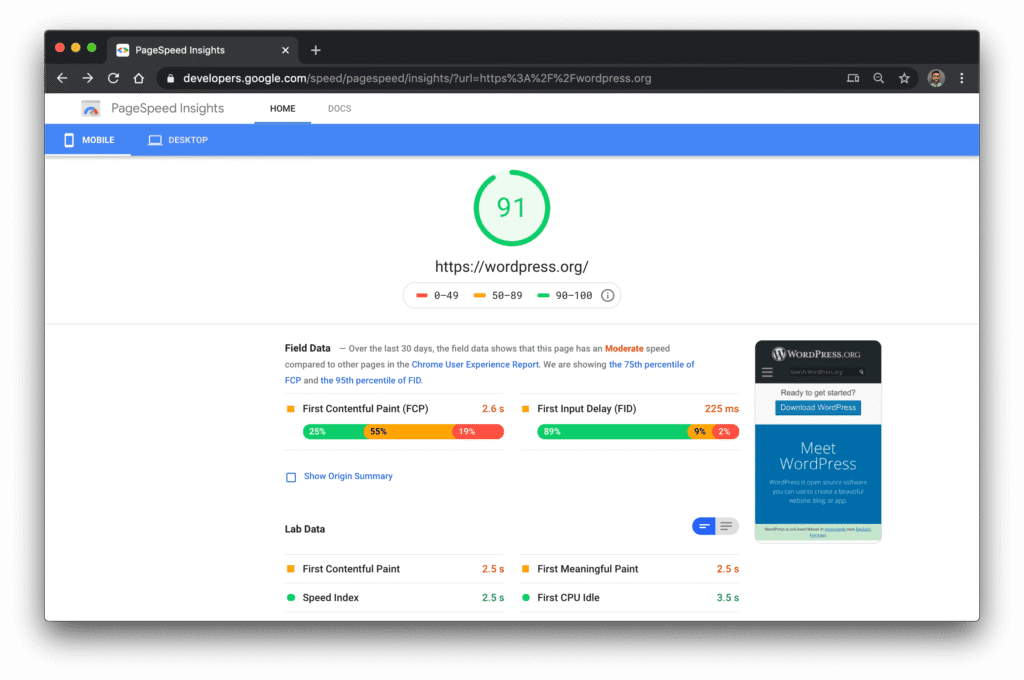
Screenshot of Google PageSpeed Insights showing mobile performance score and key speed metrics for wordpress, useful for webste speed optimization

A website’s speed is more than a number — it’s a first impression.

When someone visits your site, the first few seconds decide everything:

  • Will they stay?

  • Will they scroll down?

  • Will Google recommend your site?

  • Will your ads perform well?

Here’s why speed matters so much:

1. Higher SEO Rankings

Google has confirmed that page speed is a ranking factor. A slow site pushes you down the search results, no matter how good your content is.

2. Better User Experience

People expect instant results. If your site takes more than 3 seconds to load, more than 50% of users leave.

3. Better AdSense RPM & Engagement

Faster pages =

  • More page views

  • Better interaction

  • Higher revenue potential

AdSense prefers websites that deliver a clean, fast, user-friendly experience.

4. Improves Trust & Professionalism

A speedy, smooth site makes your brand look competent and reliable.

Common Issues That Slow Down Your Website

Many beginners struggle with website speed simply because they don’t know what affects it.

Let’s break down the most common problems:

1. Large Images

Images that haven’t been compressed or resized can drastically increase load times.

2. Too Many JavaScript & CSS Files

Themes, plugins, animations… they all add scripts that slow your site.

3. Poor Hosting

Cheap shared hosting = slow response time.

4. No Caching

Every time someone loads your site, the browser puts in extra work if caching isn’t enabled.

5. Unoptimized Themes

Heavy themes with unnecessary animations or bloated code can kill performance.

6. Too Many Plugins

Every plugin adds weight — even if you don’t use its full features.

Step-by-Step Website Speed Optimization for Beginners

Here’s the simple, practical roadmap to improve your website speed — even if you’re not technical.

1. Optimize & Compress All Images

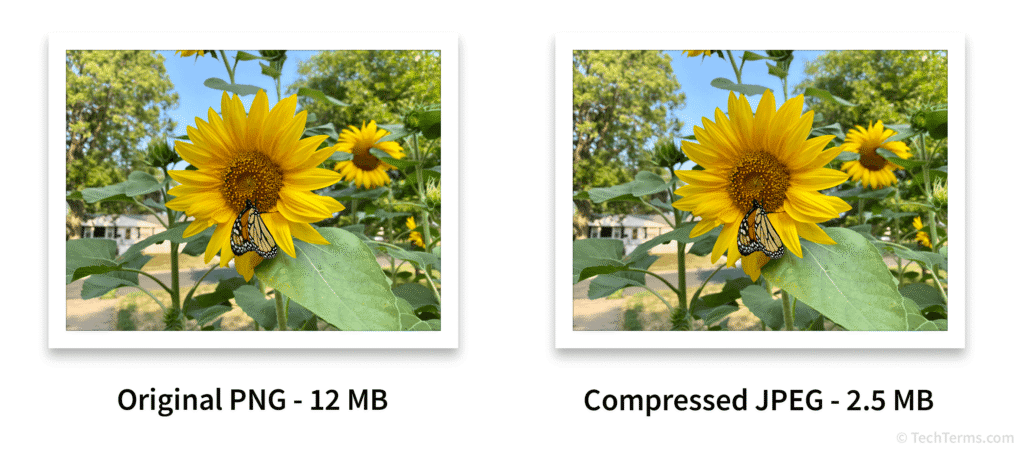
Side-by-side comparison of original PNG and compressed JPEG image showing file size and visual quality that helps to improve website speed optimization

Images are usually the No. 1 culprit behind slow websites.

What you should do:

  • Compress images (TinyPNG, ShortPixel, or Imagify)

  • Convert images to WebP format

  • Resize images before uploading (don’t upload 4000px-wide images unless necessary)

Real-life example:

A 1 MB image, when compressed, becomes 100–200 KB — 10x faster to load.

2. Enable Browser Caching

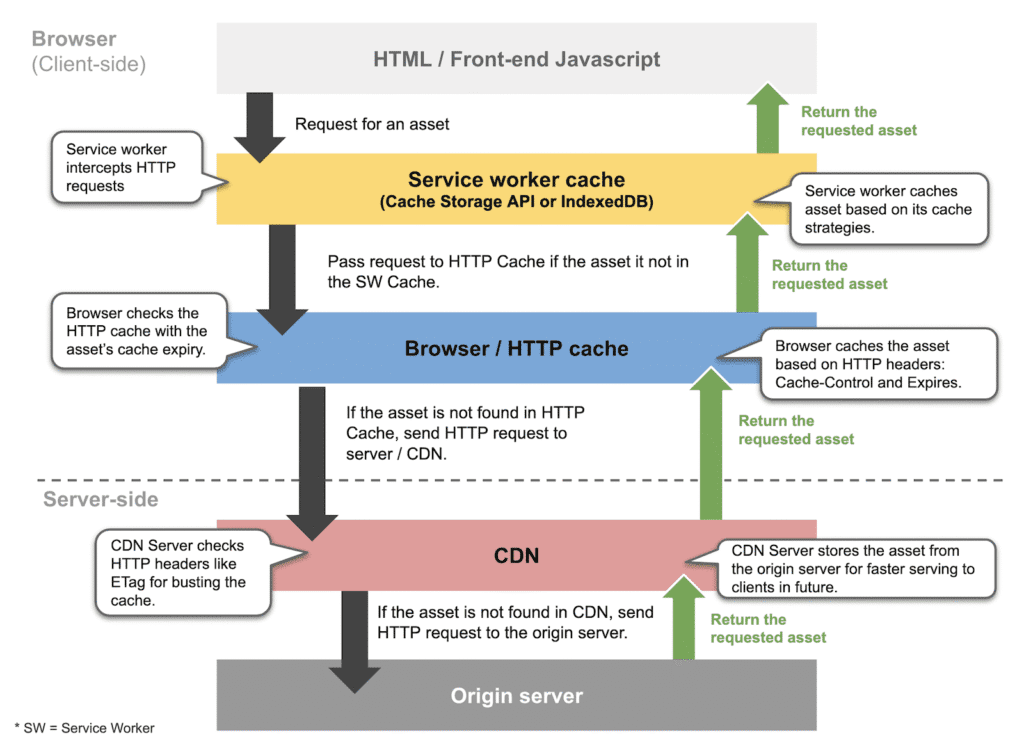
Flowchart showing browser caching process from service worker and HTTP cache to CDN and origin server that's necessary for website speed optimization

Caching tells the browser to “store” certain files so they don’t reload every time.

How to do it:

  • WordPress users: Install WP Super Cache or W3 Total Cache

  • Others: Add caching rules in .htaccess (your developer can do this easily)

Caching alone can reduce load time by 30% to 60%.

3. Use Lazy Loading for Images & Videos

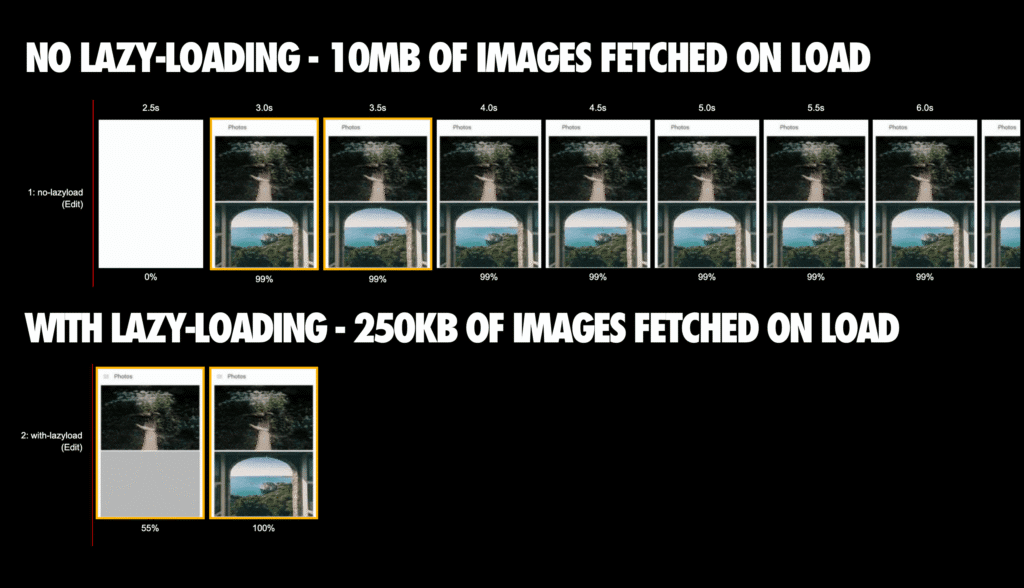
Comparison of website image loading with and without lazy-loading showing data usage and load progress

Lazy loading means images load only when users scroll to them.

Benefits:

  • Increases page speed instantly

  • Reduces initial load time

  • Improves user experience on mobile

Most modern themes support lazy loading automatically, but you can also use:

  • Lazy Load by WP Rocket

  • Native browser lazy loading (loading="lazy")

4. Minify CSS and JavaScript Files

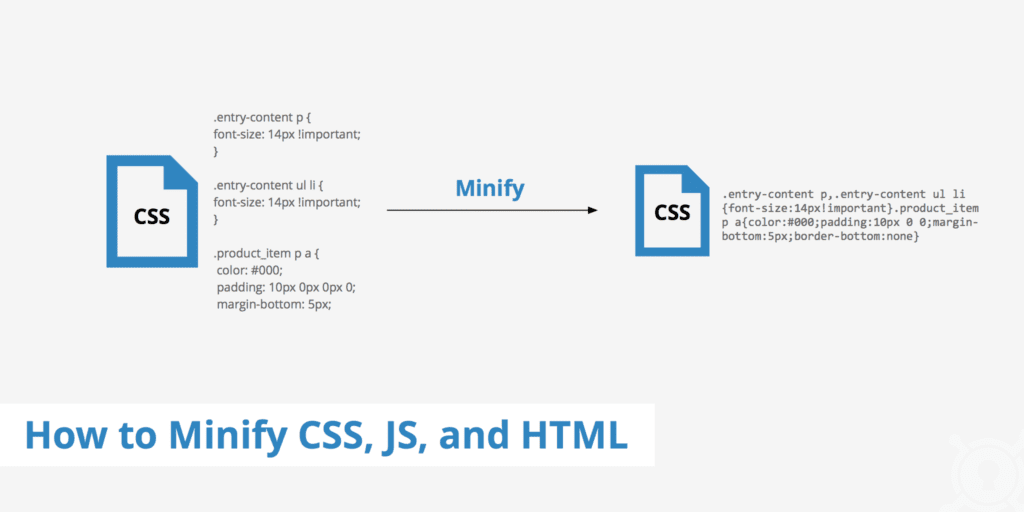
Side-by-side comparison of original and minified CSS code demonstrating website performance optimization

Minifying removes unnecessary characters from code files without changing their function.

Tools to use:

  • Autoptimize (WordPress)

  • Asset CleanUp

  • Cloudflare minification

This cuts size and boosts page performance significantly.

5. Choose Better Hosting

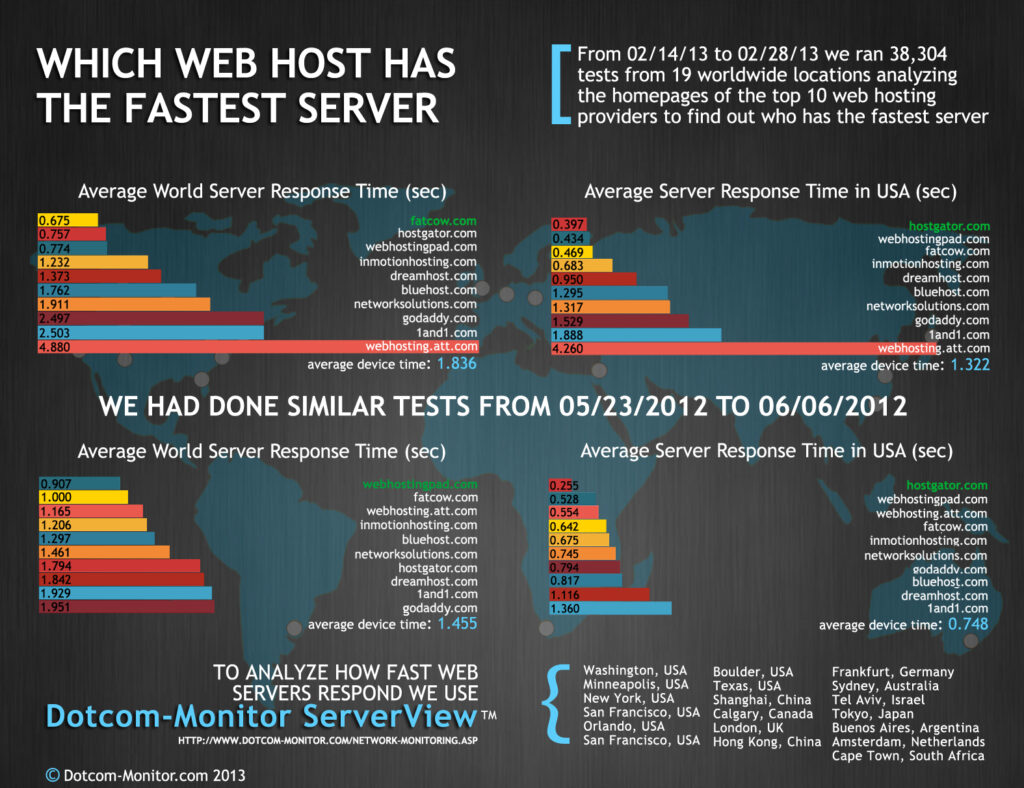
Infographic showing hosting server architecture and its impact on website performance and speed

If your hosting server is slow, no amount of optimization will help.

Recommended hosting traits:

  • SSD storage

  • PHP 8+

  • LiteSpeed servers

  • Free CDN support

  • Good uptime

For a beginner, a LiteSpeed hosting plan can give you an instant speed boost.

6. Use a CDN (Content Delivery Network)

Diagram of global CDN architecture showing origin server, distributed CDN nodes, and content delivery to end users

A CDN stores your website’s files on multiple servers worldwide.

Benefits:

  • Faster global access

  • Reduced server load

  • Better core web vitals

Free CDN option: Cloudflare

7. Remove Unnecessary Plugins

Too many plugins = slow performance + security issues.

Steps:

  • Deactivate plugins you never use

  • Delete old plugins

  • Replace heavy plugins with lighter alternatives

Recommended Tools & Speed Optimization Checklist

Here is your easy, beginner-friendly checklist:

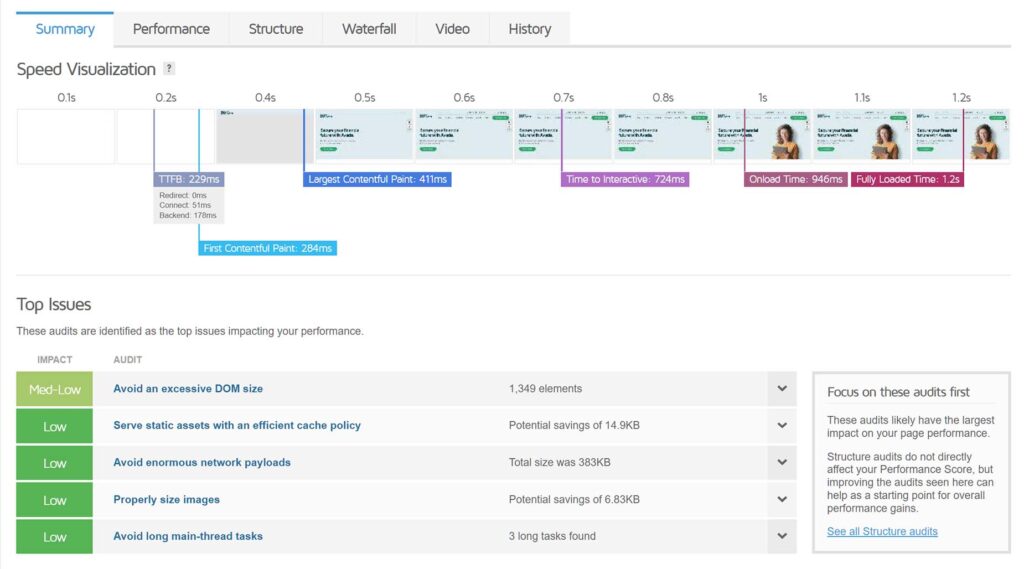
GTmetrix performance report showing speed visualization timeline and top audit issues with impact ratings

Speed Testing Tools

  • Google PageSpeed Insights

  • GTmetrix

  • Pingdom

  • Lighthouse

Image Tools

  • TinyPNG

  • Canva (resize before upload)

  • ShortPixel

  • WebP Converter plugins

Optimization Tools

  • Cloudflare (CDN + security)

  • Autoptimize

  • WP Super Cache

  • LiteSpeed Cache

Check Before Publishing a Page

  • Images < 200 KB

  • Compressed WebP versions

  • Lazy loading enabled

  • Minified scripts

  • Caching active

  • Tested on mobile

Before & After Example — Real Impact on SEO & UX

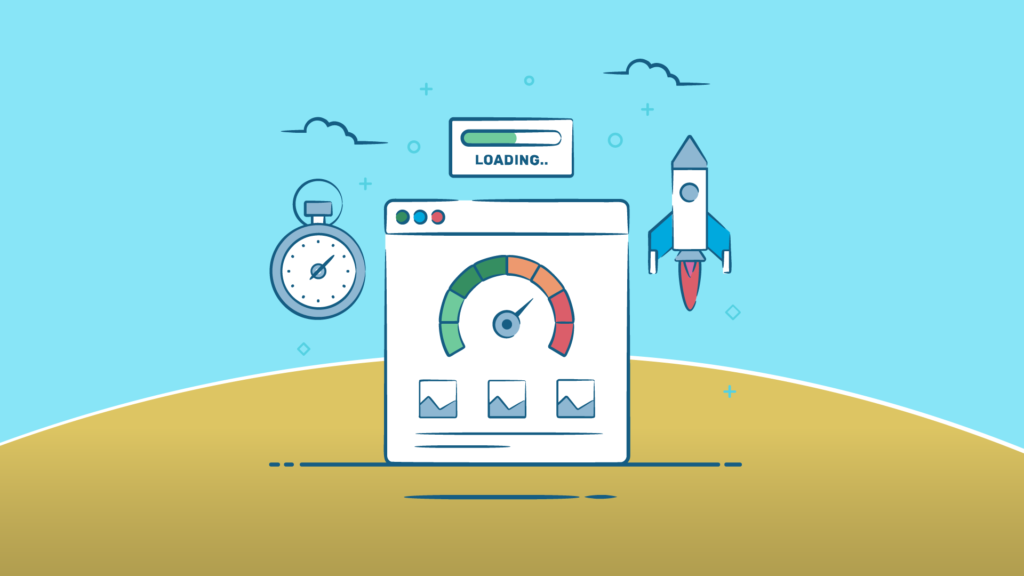
Illustration of website speed optimization with speedometer, loading bar, stopwatch, and rocket icons

Before Optimization:

  • Load time: 6–8 seconds

  • Large 1–3 MB images

  • No caching

  • High bounce rate (70–90%)

  • Lower SEO ranking

After Optimization:

  • Load time: 1.2–2.0 seconds

  • Image size reduced by 80–90%

  • Smooth mobile experience

  • Bounce rate improves to 30–50%

  • Higher rankings due to improved Core Web Vitals

  • Better AdSense performance & user trust

Even small improvements like using WebP or lazy loading can boost speeds dramatically.

FAQs

1. Why is website speed important for SEO?

Google uses page speed as a ranking factor. Faster websites rank higher.

2. What slows down a website the most?

Large images, unoptimized scripts, bad hosting, and too many plugins.

3. How fast should my website load?

Aim for under 2 seconds for the best user experience.

4. Do I need a CDN?

If you want global audience reach and better speed, yes — even free CDNs like Cloudflare help.

5. Does website speed affect AdSense revenue?

Yes. Faster pages lead to higher engagement, more ad impressions, and better revenue.

Conclusion

Website speed optimization may look like a technical challenge, but with the right steps, even beginners can transform their websites. A faster site brings more visitors, higher SEO rankings, better AdSense revenue, and a smoother experience for everyone.

Start with the basics — compress images, enable caching, remove unnecessary plugins — and slowly integrate advanced tools such as CDNs and minification.

Website speed is not a one-time task; it’s an ongoing commitment to improving user experience.

And the best part?

You don’t need coding knowledge to make your site fast — just the willingness to follow simple, practical steps.

One thought on “Beginners’ Guide to Website Speed Optimization — Improve Load Time & SEO

Leave a Reply

Your email address will not be published. Required fields are marked *